Chart JS V4
Fecha: 13 de Abril de 2026
Autor: Daniel Nager Carpio
Primeros pasos:
En una nueva carpeta, crea el archivo package.json con el siguiente contenido:
{
«name»: «chartjs-example»,
«version»: «1.0.0»,
«license»: «MIT»,
«scripts»: {
«dev»: «parcel src/index.html»,
«build»: «parcel build src/index.html»
},
«devDependencies»: {
«parcel»: «^2.6.2»
},
«dependencies»: {
«@cubejs-client/core»: «^0.31.0»,
«chart.js»: «^4.0.0»
}
}
Una vez llevado a cabo el paso anterior, lanza el comando npm install para instalar las librerías que se guardan en la carpeta node_modules.
Crea el documento index.html bajo la carpeta src/ del directorio en donde se encuentra el package.json
<!doctype html>
<html lang=»en»>
<head>
<title>Chart.js example</title>
</head>
<body>
<!– <div style=»width: 500px;»><canvas id=»dimensions»></canvas></div><br/> –>
<div style=»width: 800px;»><canvas id=»acquisitions»></canvas></div>
<!– <script type=»module» src=»dimensions.js»></script> –>
<script type=»module» src=»acquisitions.js»></script>
</body>
</html>
Finalmente, crea el archivo acquisitions.js con el siguiente contenido:
import Chart from ‘chart.js/auto’
(async function() {
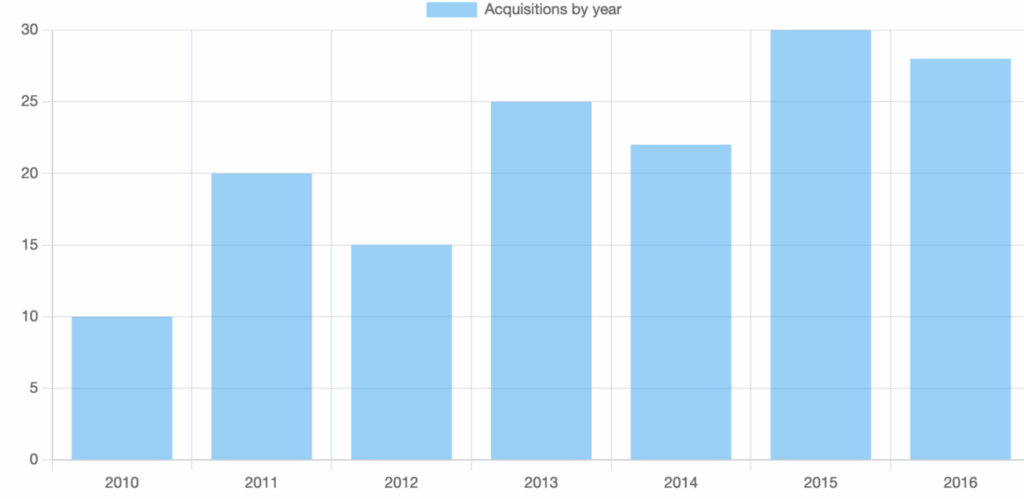
const data = [
{ year: 2010, count: 10 },
{ year: 2011, count: 20 },
{ year: 2012, count: 15 },
{ year: 2013, count: 25 },
{ year: 2014, count: 22 },
{ year: 2015, count: 30 },
{ year: 2016, count: 28 },
];
new Chart(
document.getElementById(‘acquisitions’),
{
type: ‘bar’,
data: {
labels: data.map(row => row.year),
datasets: [
{
label: ‘Acquisitions by year’,
data: data.map(row => row.count)
}
]
}
}
);
})();
Ahora ejecuta un npm run dev, accede al navegador a la url http://localhost:1234/
y verás lo siguiente:
Algunas modificaciones, cambia el “Chart(…)” por el siguiente codigo:
new Chart(
document.getElementById(‘acquisitions’),
{
type: ‘bar’,
options: {
animation: false,
plugins: {
legend: {
display: false
},
tooltip: {
enabled: false
}
}
},
data: {
labels: data.map(row => row.year),
datasets: [
{
label: ‘Acquisitions by year’,
data: data.map(row => row.count)
}
]
}
}
);
Como puedes comprobar, se han sacado animaciones.
Si quieres resetear cache, haz lo siguiente:
rm -rf .parcel-cache
Página de donde sacar el cdn y documentación oficial:
script src=»https://cdnjs.cloudflare.com/ajax/libs/Chart.js/4.5.0/chart.min.js» integrity=»sha512-n/G+dROKbKL3GVngGWmWfwK0yPctjZQM752diVYnXZtD/48agpUKLIn0xDQL9ydZ91x6BiOmTIFwWjjFi2kEFg==» crossorigin=»anonymous» referrerpolicy=»no-referrer» script